Long-distance motorcycle touring is about freedom, rhythm, and endurance. Hours on the highway, changing weather, unfamiliar roads, and constant wind noise all test your gear — especially the communication system for touring. A touring motorcycle intercom is not the same as a short-ride or commuter intercom. On a multi-day trip, small weaknesses become big problems: […]


How To Turn Any Helmet Into Bluetooth Helmet: Call And Music Even Intercom Simple Steps
Adding Bluetooth stereo earphones to your motorbike safety helmet can enhance your riding experience 10 times (according to my backpack wife). But, how to turn any helmet into a Bluetooth helmet for the budget?
If you have a low budget, after that, what you are not most likely to do is change her preferred--
I just got broke in a helmet with a new one that sets you back upwards of $500 Bluetooth helmets.
This is why you are going to add a basic Bluetooth communicator and also a pair of audio speakers to her or yours, I think.
Table of Contents
How to Turn Any Helmet into Bluetooth Helmet: Call and Music
What is a Bluetooth headset on a motorbike Helmet?
A Bluetooth motorbike safety helmet is a communication service that keeps you connected when riding.
You do not need to be cut off from interaction when you're riding a bike.
With a Bluetooth headset, you can listen to music and talk with other people while riding.
It is constantly difficult to ride your bike and answer a phone call when it rings.
You will need to park your bike to answer the call.
Making interactions, listening to tracks, and obtaining instructions via Bluetooth has always been wanted by motorcycle riders.
Yet it is not all Helmets that feature such advancement.
For only music and call under 50 dollars
If you only need music and calls, a FX-S Bluetooth headset can be mounted right into a helmet. All you need is to connect it to your phone.
Or, maybe music and call is still not enough for you. You can also have a safe and easy talk to the passenger or other rider with the FX-S, without using phone calls or roar loudly.
For: music and call with intercom:
Why do we need a Bluetooth communication device?
A Bluetooth communication gadget is needed on your Helmet.
You don't have to quit your bike to respond to a phone call while riding.
When you have a Bluetooth tool installed, you can do this without anxiety.
It likewise helps to avoid mishaps, as you can concentrate well while riding.
Installation Without Outside Adjustments.
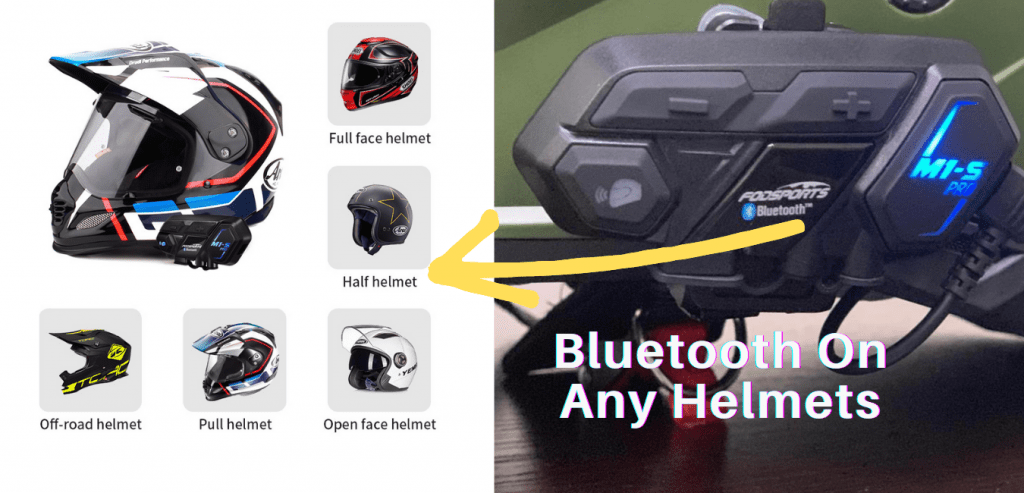
You can make phone calls and listen to songs through the helmets intercom. It is not only safe but also easy for the chauffeur and front passenger or two riders to communicate.
You do not have to spend so much to install Bluetooth on your motorbike.
You can do it by yourself by adhering to a few steps.
How to install a Bluetooth headset on a motorbike safety helmet.
Intercom for Music
Just how to Install a Bluetooth on Motorbike Helmet
1: Evaluate the Inner Location of the Helmet.
Before setting up the safety helmet's microphone, you need to check the inside of the Helmet well.
The audio speakers should be placed near the ear.
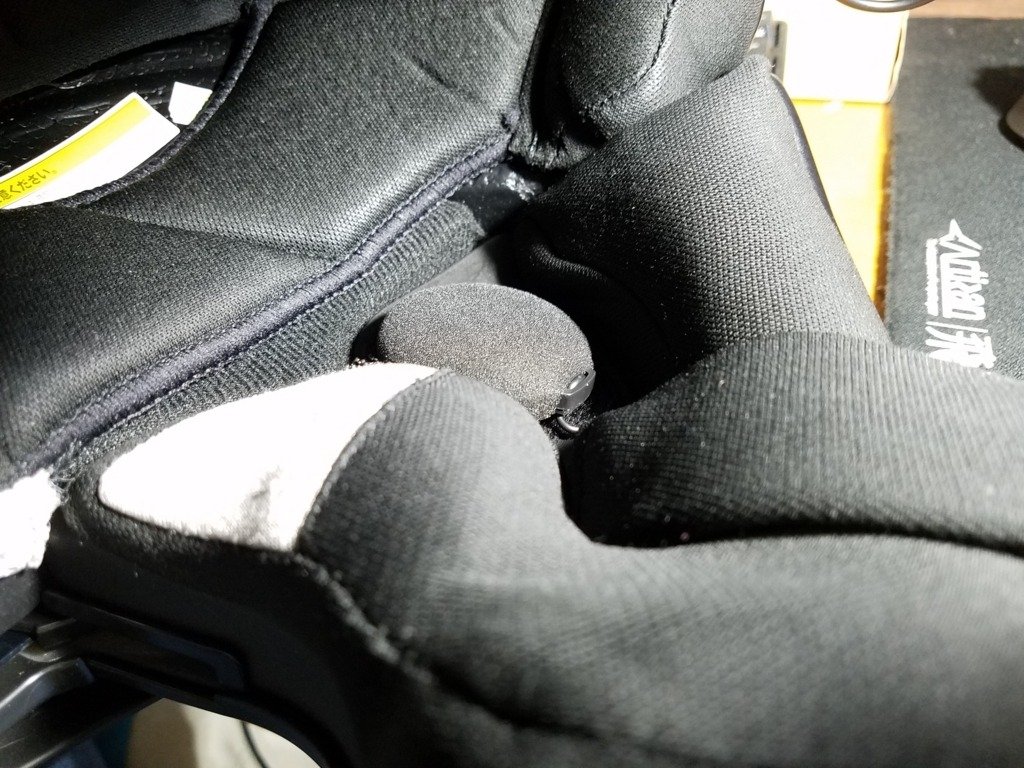
Check the extra padding well within the safety helmet, and make sure there is enough room inside it.
Some helmets have no more space inside them; you have to peel off the back of their lining.
2: Cut Foam for Audio Speakers.
When you obtain the placement to keep the audio speaker, you have to remove the foam liner around the ear area.
It is a must to fit the safety helmet in the same way that it was before setting up the speakers.
Remove the foam around the speakers. It is better to make the outline area by tracing the audio speakers on the foam.
3: Clean Ear Pocket.
After the foam is removed, clean out the pocket area with a tidy towel and also rub with alcohol. This may prepare the area for mounting speakers.
4: Mount the Audio speaker.
Peel back the paper from the Velcro at the back of the speakers, then press the speakers to the location.
Make sure it sticks well, then move to the microphone.
5: Position the Microphone and Amplifier.
Install the amplifier pack and the boom microphone by the side of the helmet to protect the Bluetooth headset.
The microphone has to be kept in a position where it may line up with the rider's mouth. You can use a pen or pencil to locate the position.
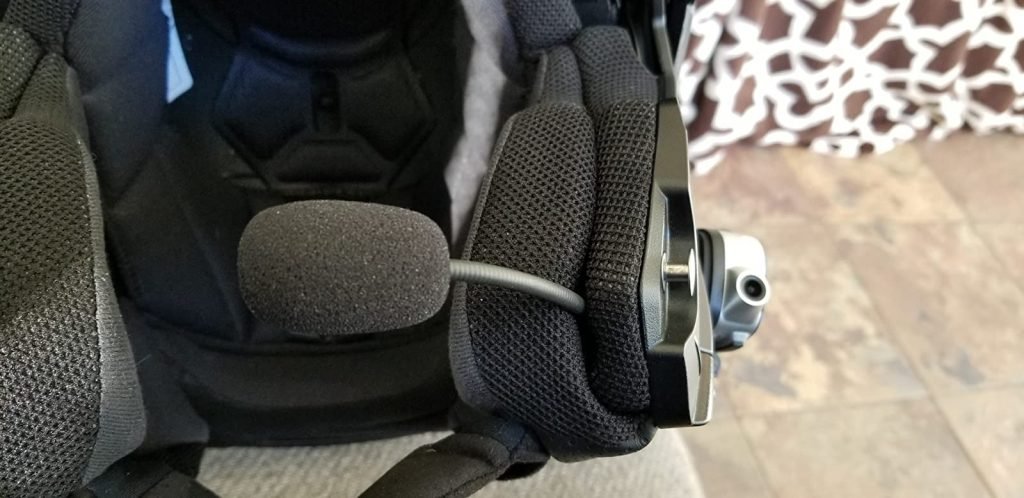
Step 6: Set Up Microphone.
Make the drill on the side of the helmet to keep the microphone amplifier sideways. Get in the screws as well as apply the nuts to tighten up the little bolts.
Step 7: Press Wires into the Lining.
At first, set up the microphone amplifier well.
What you need to do next is to make sure that the wires are secured and concealed.
Most of the riders will use a wooden device to do this task.
Select the device and then the cords to the seams of its cellular lining.
Step 8: Setting Boom and Test.
Add the boom mic with the Helmet and do a test with the various other gadgets. You need to make a pair test with various other Bluetooth devices.
Exactly how to set up bluetooth headset on a bike helmet Frequently asked questions.
How does Bluetooth work in a motorcycle safety helmet?
Bluetooth modern technology does not use cords. They use piconets instead. These are what make it possible to link to various other devices.
The Bluetooth in a motorcycle helmet works by wirelessly connecting to your smartphone or other devices.
Then you can listen to music, make/answer phone calls, use GPS, or other functions on your phone.
Also, you can talk to other riders with Bluetooth while riding on the road.
How do I utilize a Bluetooth helmet?
Turn on the safety helmet's Bluetooth, most likely to your tool, and also locate the gadget.
Coupled with it, as well as you're excellent to go..
Can I add Bluetooth to my bike helmet?
The Helmet comes with a dual innovation that allows for more than one Bluetooth.
You can include additional Bluetooth to your gadget and also use both at once.
Can I include Bluetooth to any type of helmet?
Not all helmets come with modern technology that supports Bluetooth tools.
However, you can likewise install it by yourself.
Can I listen to songs with my Bluetooth?
You can link your safety helmet's Bluetooth to any kind of tool, as well as play songs from it.
Rather very easy.
Final Words
Mounting a Bluetooth headset on your bike Helmet is quite easy.
It enables you to be linked even while riding.
You get to connect with other motorcyclists, and you can pay attention to music while you ride.
It also stops accidents in a way, in that you don't need to shed focus while trying to operate your phone.
It doesn't need a whole lot for you to install Bluetooth on your own, or you want to check How To Choose The Best Motorcycle Intercom For You
You can do it on your own with minority pointers that have actually been highlighted over.

With over 10 years of experience working on cars and trucks Item Training Supervisor Richard Reina is known around the office as one of our technical experts & real an "automobile person".
His rate of interest began, in his very own words, "at the age of two when his father educated him the distinction in between a Chevy and a Ford. Since then it's been cars regularly."
As a serious lover of practically all things with a motor Richard can address nearly any kind of inquiry related to car upkeep, fixing, or restoration & is a fact professional in electric motor background.
You maybe like to read:
Best Adventure Bikes for Beginners (2026 Guide)
Adventure motorcycles, often called ADV bikes, are built to take you from smooth highways to rough backcountry trails. For new riders, picking the best adventure bikes for beginners can make all the difference. The right machine turns highways, gravel roads, forest tracks, and remote trails into places you actually want to explore, while the wrong […]
Best Motorcycle Intercom for Group Rides (2–20 Riders)
Riding in a group is thrilling, but without clear communication, even the best rides can turn chaotic. That’s where motorcycle intercom systems come in, letting you talk with your group, share GPS directions, listen to music together, and stay safer on the road. Whether you’re riding with a single friend or leading a pack of […]
Budget Motorcycle Intercoms from Fodsports: Honest 2026 Picks
I’ve used premium intercoms and budget ones on the same roads, in the same weather, on long touring days. The truth? Most riders don’t need a $400 system. Most riders still need the same basics: clear rider-to-rider talk, stable Bluetooth, and batteries that last a full day on the road. In 2026, budget motorcycle intercoms […]
2026 Best Motorcycle Intercom for Beginners from Fodsports
What is the best motorcycle intercom for beginners? If you’re a new rider, the idea of adding another piece of tech to your helmet can feel overwhelming. I’ve been using motorcycle intercoms for years—on solo rides, long tours, group trips, and daily commutes—and I’ll tell you this upfront: A beginner motorcycle rider doesn’t need the […]
Mesh Intercom vs Bluetooth Intercom: Which Motorcycle Communication System Is Better?
Mesh Intercom vs Bluetooth: Which Motorcycle Communication System Is Better? Mesh intercoms are best for riders who travel in groups because they automatically reconnect and stay stable, while Bluetooth intercoms are better for solo riders and two-up riding due to lower cost and simpler operation. As someone who both wrenches on bikes and rides long […]
Thanks for sharing. Very Informative and Impressive. I like it.
Helmet with buletooth setting is great. Thanks for sharing.
Richard merci pour votre article très instructif , je me suis commandé un kit similaire sans module apparent
j'espère pouvoir l'installer aussi bien que vous.
[…] good ventilation keeping you cool. Advanced features like built-in lights, GPS tracking, and Bluetooth add functionality and […]